
You are here
EzeScan Server
EzeScan SERVER
EzeScan SERVER provides highly automated document digitisation functionality for both your workgroup and workflow document processing requirements including: Image Enhancement, File Conversion, OCR / Text Searchable PDF/A, Data Capture, Document Routing.
As an enterprise digitisation platform EzeScan SERVER can align your business processes and satisfy your standards, governance and compliance requirements. With one product you can unify the capabilities of all your capture devices with your business needs whilst at the same time making it effortless for your staff to capture and process documents.

Easy To Use
EzeScan SERVER watches for incoming documents from multiple sources, e.g. network folders, email mailboxes, FTP Servers or EzeScan WebApps. When a document arrives, EzeScan SERVER can detect barcodes or import metadata information and process and route the document accordingly. EzeScan SERVER can upload the document and metadata to one of its supported Integrations* or simply store documents in a network folder or forward them via email.
Multi-function devices or dedicated scanners can be used to provide documents to EzeScan SERVER for processing. Depending on the device functionality, the operator can add metadata at the time of scanning or utilise the optional EzeScan Remote Indexing Assistant (RIA) WebApp. EzeScan SERVER can use this metadata to populate fields in the EDRMS or server location.
Documents can be processed individually or in batches, giving your organisation a cost effective and flexible decentralised capture solution. In centralised production workflows, EzeScan SERVER can be utilised for background OCR processing, PDF/A conversion and upload. Production operators can also route to other users via the optional EzeScan Remote Indexing Assistant (RIA) WebApp for staff to contribute to the indexing workflow.
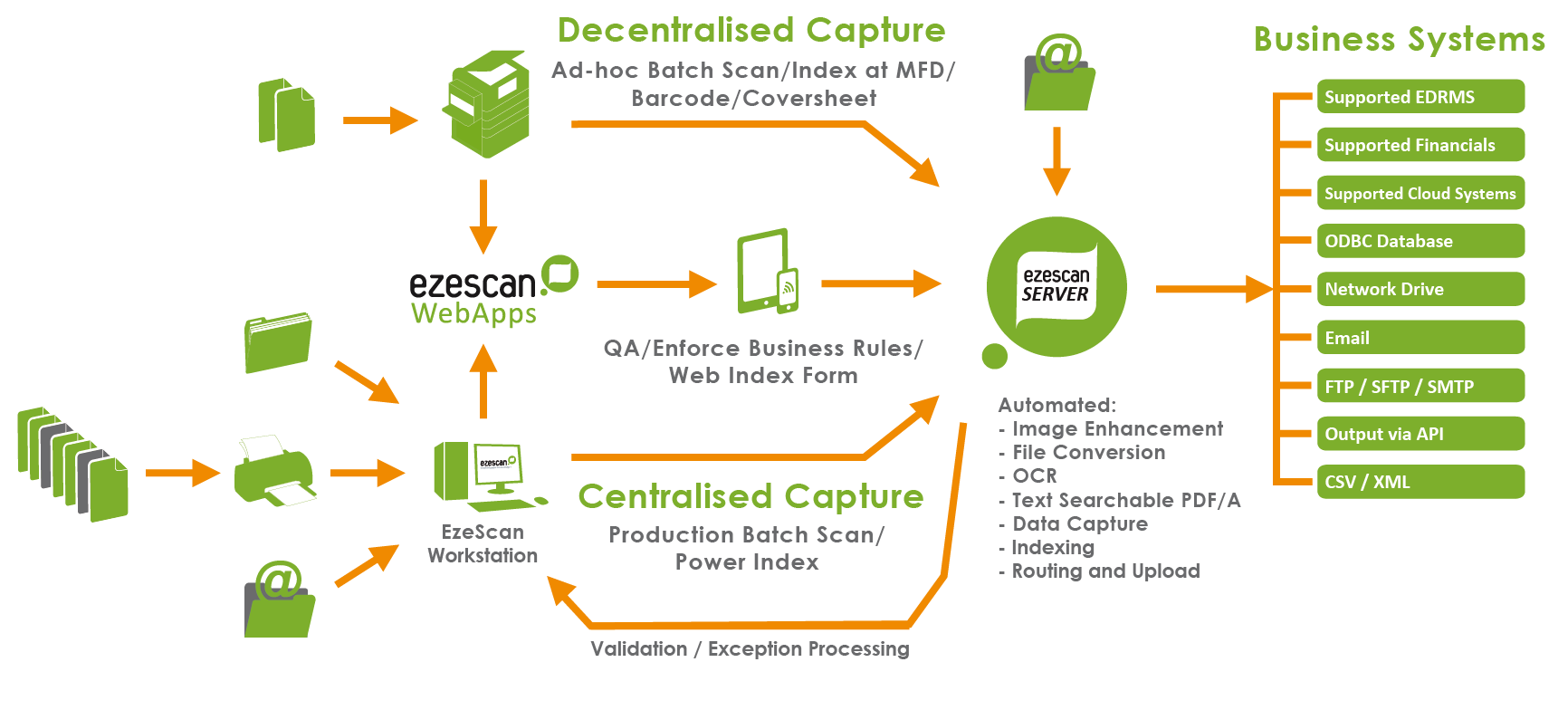
EzeScan SERVER Functionality & Features
Batch Detection Features
- Separator Pages (i.e. white or black)
- Fixed Page Count
- Barcode
Enhancement Features
- Crop Border
- Deskew
- Despeckle 1x1
- Despeckle 3x3
- Delete Blank Pages
- Remove Extra Separators
- Rotate Using BCR or OCR
- Discard First Page
Output features
- Output as Group 4 TIF
- Output as Image Only PDF
- Output as Text Searchable PDF
- Output to PDF/A-1a (Image + Text Searchable)
- Output to PDF/A-1b (Image Only)
- Output to directory
- Output to Email Address
- Output to FTP Server
- Output to Fax Number (requires Winfax Pro)
- Output to Printer
- Output to INDEX module
Output via UPLOAD (output to supported integration and transfer method)
Deployment
- Microsoft Windows Server operating systems that support Microsoft .NET Framework Version 4.7.1 and above
- Simple installation process (MSI)
- Minimal training required to operate
- Documentation provided in PDF
EzeScan SERVER Optional Modules
EzeScan SERVER can also provide Forms Processing capabilities utilising data capture technologies such as OCR/ICR/OMR and smart templates (DISCOVERY). Scan processing bottlenecks can be significantly reduced by automating what is traditionally a labour intensive task. Exceptions can be routed for subsequent verification processing on an EzeScan index/verify workstation.
Utilising the optional EzeScan AUDIT module in conjunction with EzeScan SERVER, organisations are able to produce detailed scanning reports to assist in cost recovery.
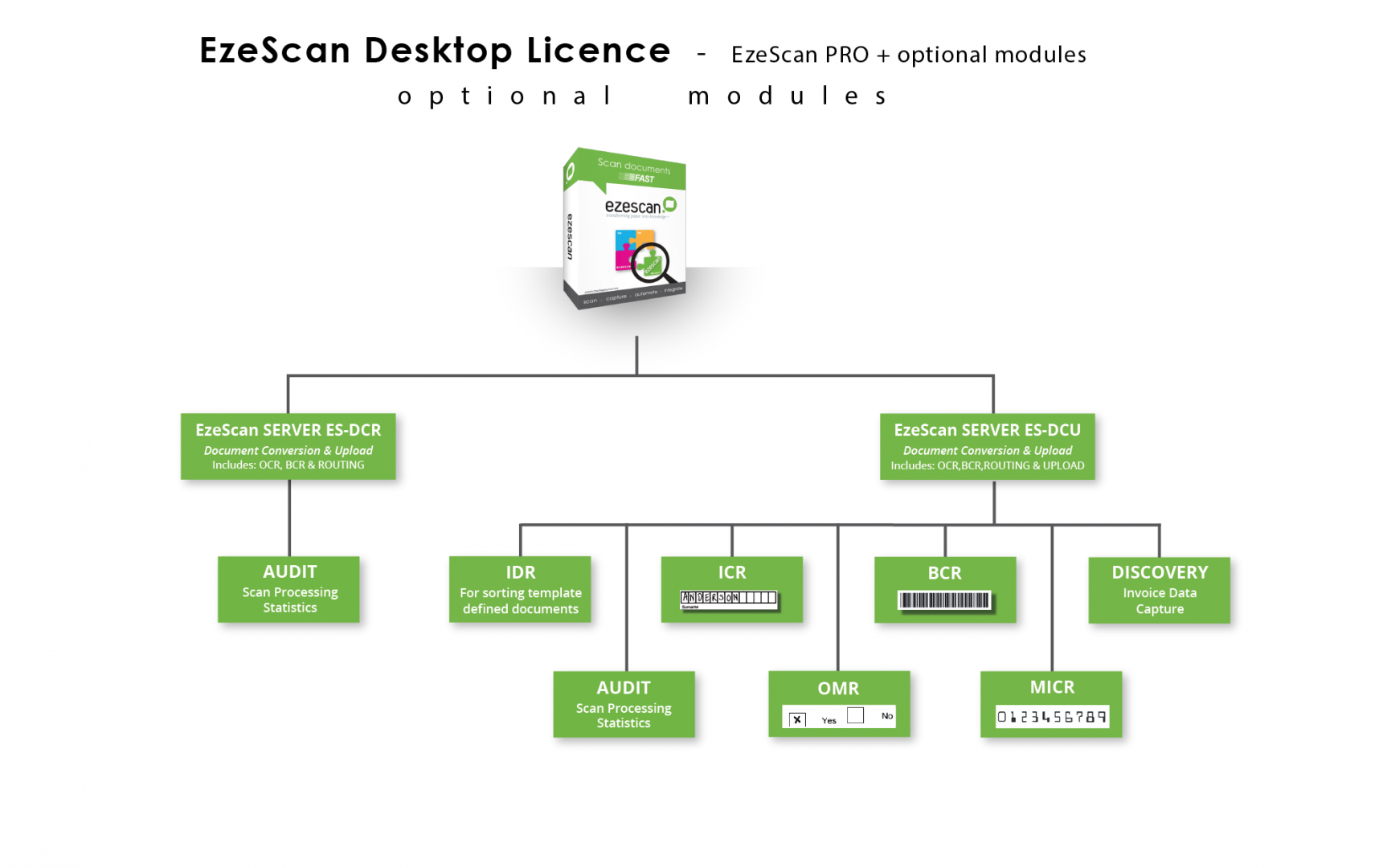
To find out more information on any of these modules visit our Modules page
EzeScan SERVER supported Integrations
EzeScan SERVER provides capture functionality for the following third party products and transfer methods (optional modules can be added including DISCOVERY + LINES for accounts payable solutions).
To find out what integrations EzeScan currently supports click here.
PLEASE NOTE:
- Levels of integration and functionality may vary dependent on third party system capabilities.
- Some supported systems may require an API toolkit licence, licensed separately from the system vendor.
- EzeScan resellers are not automatically authorised to resell all the listed supported integrations.
- Ensure your selected EzeScan reseller is qualified to deliver your capture solution for your third party system.
Please call to confirm.